
Buy iTunes Gift Cards Online With Crypto: Complete Guide in 2026


Buying iTunes gift cards online is a convenient way to add funds to your Apple Account for apps, games, music, subscriptions, movies, and other eligible digital purchases.
For cryptocurrency users, there is another advantage: you can purchase a gift card using crypto rather than relying solely on traditional payment methods.
At Jour Cards Store, customers can buy iTunes gift cards online using supported cryptocurrencies, with digital delivery after payment confirmation.
This guide explains how the process works, what to check before purchasing, how to redeem your card, and how to avoid common problems such as buying a gift card for the wrong region.
Why Buy iTunes Gift Cards Online?
Buying a digital iTunes or Apple gift card online eliminates the need to search for a physical card at a local retailer.
Instead, you can choose the card you need, complete your payment online, and receive a digital code.
Some of the main advantages include:
Convenient online ordering — Purchase from your phone, computer, or tablet.
Digital delivery — Receive your gift card code electronically after your payment is confirmed.
Multiple denominations — Select a card value that matches your needs.
Regional options — Choose a gift card designed for the country or region associated with your Apple Account.
Cryptocurrency payments — Crypto holders can use supported digital currencies to purchase gift cards.
For customers who prefer cryptocurrency, buying an iTunes gift card with crypto provides a practical way to turn digital assets into Apple Account credit.

How to Buy iTunes Gift Cards Online With Crypto
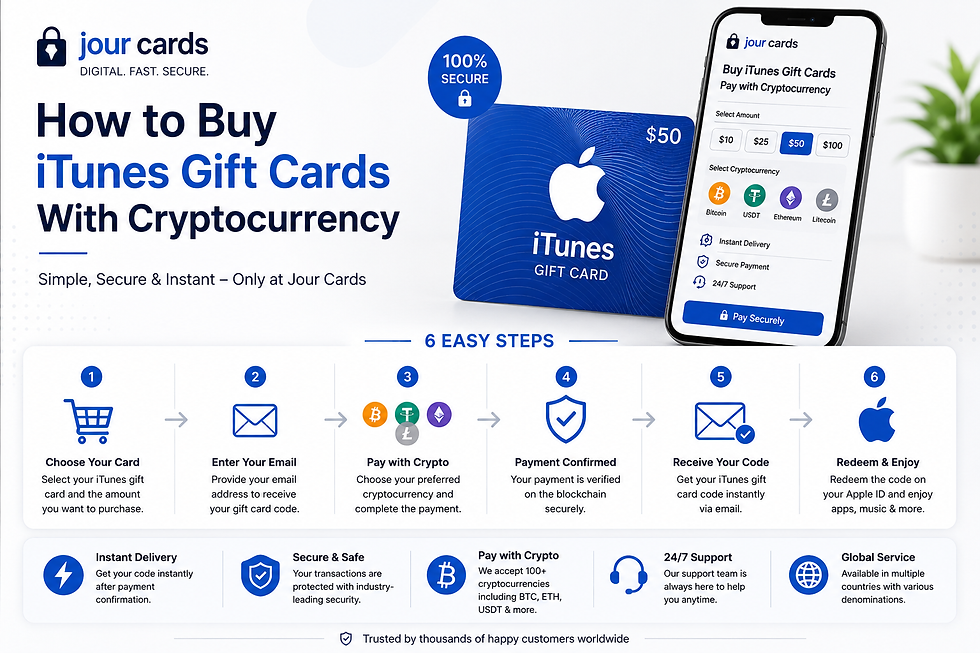
Purchasing an iTunes gift card with cryptocurrency through Jour Cards Store is straightforward.
1. Choose Your Gift Card Region
First, select the country or region that matches your Apple Account.
This is extremely important because gift cards can be region-specific. For example, a US gift card should generally be purchased for an Apple Account using the US storefront.
Always check the region before completing your order.
2. Select Your Gift Card Value
Choose the denomination you want to purchase.
Jour Cards Store offers different card values depending on the selected country or region.
3. Select Your Payment Method
At checkout, choose one of the currently supported payment methods.
Depending on availability, cryptocurrency payment options can include popular digital currencies such as Bitcoin, Ethereum, USDT, Litecoin, Dogecoin, and others.
Always check the checkout page for the current list of supported coins and networks before sending payment.
4. Send Your Cryptocurrency Payment
Follow the payment instructions carefully.
When transferring cryptocurrency, verify:
The wallet address
The cryptocurrency
The blockchain network
The exact payment amount
Any applicable network fees
Cryptocurrency transactions can be difficult or impossible to reverse, so checking these details before sending your payment is important.
5. Receive Your Digital Gift Card Code
Once the payment has been successfully confirmed and the order processed, your digital gift card code is delivered electronically according to the store's current delivery process.
Keep the code private. A gift card code should be treated similarly to cash because someone who obtains a valid unused code may be able to redeem it.
6. Redeem Your Gift Card
After receiving your code, redeem it to the appropriate Apple Account.
Your available balance can then be used for eligible Apple purchases and services.
Can You Buy an iTunes Gift Card With Bitcoin?
Yes. Jour Cards Store provides an option for customers who want to buy iTunes gift cards with Bitcoin.
The basic process is similar to purchasing with other cryptocurrencies:
Choose your card.
Confirm that its region matches your Apple Account.
Select the appropriate crypto payment option at checkout.
Follow the displayed payment instructions.
Wait for payment confirmation and order processing.
Receive and redeem your digital code.
The important distinction is that you are purchasing a gift card with cryptocurrency. You are not paying Apple directly with Bitcoin.
The gift card is redeemed to your Apple Account, and the resulting balance can then be used for eligible purchases.

What Can You Buy With an Apple Account Balance?
After redeeming an eligible Apple, App Store, or App Store & iTunes gift card, the funds are added to your Apple Account balance.
Depending on your country or region and Apple's applicable terms, the balance may be used for purchases such as:
Apps
Games
In-app purchases
Apple Music
iCloud+
Other eligible subscriptions
Movies and entertainment
Books and other eligible digital content
The products and services available can vary by country or region.

Are iTunes Gift Cards Still Usable?
Although Apple now uses broader terminology such as Apple Gift Card and Apple Account balance, existing App Store & iTunes gift cards remain relevant in supported regions.
When an eligible gift card is redeemed, its value is added to your Apple Account balance.
This means people searching for terms such as "iTunes gift card," "iTunes card," or "App Store gift card" may still be looking for a way to add credit to their Apple ecosystem.

How to Redeem an iTunes or Apple Gift Card
The redemption process depends on your device.
On iPhone or iPad
Open the App Store.
Tap your profile picture or sign-in button.
Select Redeem Gift Card or Code.
Follow the instructions to redeem the code.
On Mac
Open the App Store.
Sign in to your Apple Account if necessary.
Click your name.
Choose Redeem Gift Card.
Enter the code or follow the displayed redemption instructions.
On Windows
Apple's current redemption process on Windows uses the Apple Music or Apple TV app.
Open the appropriate app, sign in to your Apple Account, select your name, choose Redeem, and follow the instructions.
Important: Check the Gift Card Region Before Buying
One of the most important things to check before purchasing a digital Apple or iTunes gift card is its country or region.
Do not assume that a card purchased for one country will work with an Apple Account registered in another.
Before ordering, verify the country associated with your Apple Account and choose the corresponding gift card.
Jour Cards Store currently offers iTunes gift card options for a variety of regions. You can check available countries and denominations before purchasing.
This simple check can prevent many redemption problems.

Why Buy From Jour Cards Store?
Jour Cards Store is designed for customers looking to purchase digital gift cards online, including users who prefer cryptocurrency payments.
Some reasons customers may choose the platform include:
Cryptocurrency payment options: Customers can pay using supported cryptocurrencies available through the checkout system like Heleket, Coinpayments.
Multiple regions: Gift cards are offered for various countries, making it easier to choose a card that corresponds with your Apple Account region.
Different denominations: Available card values vary by region, giving customers flexibility when choosing how much credit they need.
Digital delivery: Gift card codes are delivered electronically after successful payment confirmation and order processing.
Online ordering: The entire purchase can be completed without visiting a physical retailer.
Ready to purchase? Browse iTunes gift cards at Jour Cards Store.

Tips for Buying iTunes Gift Cards Safely
Digital gift cards are convenient, but buyers should still take basic precautions.
Check the Region
Make sure the gift card country matches the country or region associated with the Apple Account where you plan to redeem it.
Double-Check Crypto Transactions
Before sending cryptocurrency, verify the wallet address, coin, network, and amount shown during checkout.
Never Share Your Code Publicly
Once you receive a gift card code, keep it private until it has been redeemed.
Beware of Gift Card Scams
Be suspicious if someone contacts you and demands payment specifically in Apple or iTunes gift cards.
Gift cards should not be used to pay unexpected taxes, government fees, fines, debts, technical-support charges, or strangers who pressure you into providing a code.
Keep Your Order Information
Retain your order confirmation and relevant transaction information until the gift card has been successfully received and redeemed.
Frequently Asked Questions
Q1. Can I buy an iTunes gift card online?
A1. Yes. Digital iTunes/App Store gift cards can be purchased online. Jour Cards Store provides iTunes gift cards for online purchase across multiple available regions and denominations.
Q2. Can I buy iTunes gift cards with cryptocurrency?
A2. Yes. Jour Cards Store supports cryptocurrency payment options for its digital gift cards. Available currencies and networks should be confirmed at checkout.
Q3. Can I buy an iTunes gift card with Bitcoin?
A3. Yes. Bitcoin is one of the cryptocurrency options offered for eligible purchases through Jour Cards Store.
Q4. How quickly will I receive my gift card?
A4. Digital delivery takes place after successful payment confirmation and order processing. Cryptocurrency confirmation times can vary depending on the network and transaction conditions.
Q5. Are iTunes gift cards region-locked?
A5. Gift cards can be restricted by country or region. Always purchase a card intended for the same country or region as the Apple Account that will redeem it.
Q6. Can I use my balance for Apple Music?
A6. Eligible Apple Account balance can generally be used for Apple Music and other qualifying Apple subscriptions, subject to Apple's regional terms and payment requirements.
Q7. Can I use an iTunes gift card for apps and games?
A7. Eligible redeemed balance can be used for apps, games, and in-app purchases from the App Store.
Q8. Where can I buy iTunes gift cards with crypto?
A8. You can buy iTunes gift cards with crypto from Jour Cards Store, selecting from the currently available regions, denominations, and payment options.
Final Thoughts
Buying iTunes gift cards online can be a convenient way to add funds to your Apple Account without purchasing a physical card.
For cryptocurrency users, Jour Cards Store provides an additional payment option by allowing customers to purchase supported gift cards using Bitcoin and other available cryptocurrencies.
The most important step is choosing the correct card for your Apple Account region. Once you have confirmed the region and denomination, follow the checkout instructions carefully, complete your payment, and keep your digital code secure.
Ready to get started?


Great guide on buying iTunes gift cards with crypto—super helpful for digital asset users looking to spend securely and privately. I appreciate the emphasis on matching the correct region to avoid redemption issues. For those exploring cultural gifts alongside digital purchases, choosing a meaningful Chinese name for a friend or creative project can be a unique touch. I’ve found chinesename.art useful for learning name meanings and generating authentic options.
مع بداية الفترات الدراسية الجديدة، يبحث الكثير من الطلاب عن معلومات حديثة حول الخدمات التعليمية الرقمية. يمكن أن يساعد Massar Service 2026 المستخدمين في التعرف على المعلومات والخدمات المتوفرة. ويظل الشرح المنظم والمبسط مفيداً للطلاب وأولياء الأمور الذين يريدون الوصول إلى المعلومات بسهولة.
One of the best feelings in Basketball Stars is successfully sinking a difficult shot in the final seconds and watching your opponent lose any chance of turning the game around.