
LoL How to Buy RP: Steps, Regions and Payment Checks


You've found the skin you want, opened the RP purchase window, and noticed a cheaper code on another website. Before you pay, there's a more important question than the discount: will that purchase work on your account, through an authorized payment route, without putting your login or balance at risk?
For “LoL how to buy RP,” the safest approach is straightforward: confirm your account region, use the purchase options available in the League client, and compare the total authorized cost, not just the advertised RP amount. A bargain stops being a bargain when you can't redeem it.
Looking for a voucher? See the Jour Cards League of Legends RP gift cards, and check the product's region and redemption terms against your account before paying.
Table of Contents
How to Buy RP in the League Client - Treat the confirmation screen as your final check
Matching Region, Shard and Payment Method - Use the payment options your client actually displays
RP Bundles and What Each Actually Costs - Better unit value can still mean unnecessary spending
Scam Checks Before You Pay - Check the seller before releasing payment - If you've already shared a code
Fixing Declined, Stuck or Prepaid Code Errors - Separate pending payments from invalid codes - Send support a usable record
Refunds and Chargebacks Explained - Choose the route that matches the problem
How to Buy RP in the League Client
Buy RP inside the official League of Legends client, using a payment method displayed for your account or an eligible prepaid code redeemed there. You don't need to give an outside seller access to your Riot account to complete either route.
Confirm your account's server or shard. Check the account you play on, rather than selecting a region based only on where you're physically located.
Launch the official League of Legends client and log in. If you use multiple accounts, verify that you've opened the intended one before entering the Store.
Open the Store and select Purchase RP. Choose the bundle that covers your intended purchase, taking your existing balance into account.
Select an available payment method. If you already have an authorized prepaid code, use the prepaid-card option instead of starting a separate card payment.
Review the account, currency, RP amount, and final charge. Take a screenshot of the confirmation screen for your records, keeping any payment details private.
Save the receipt or order identifier. Keep it somewhere you can retrieve it if the payment needs investigation.
Check your RP balance before paying again. A checkout that appears unresponsive isn't a reliable signal that the transaction failed.
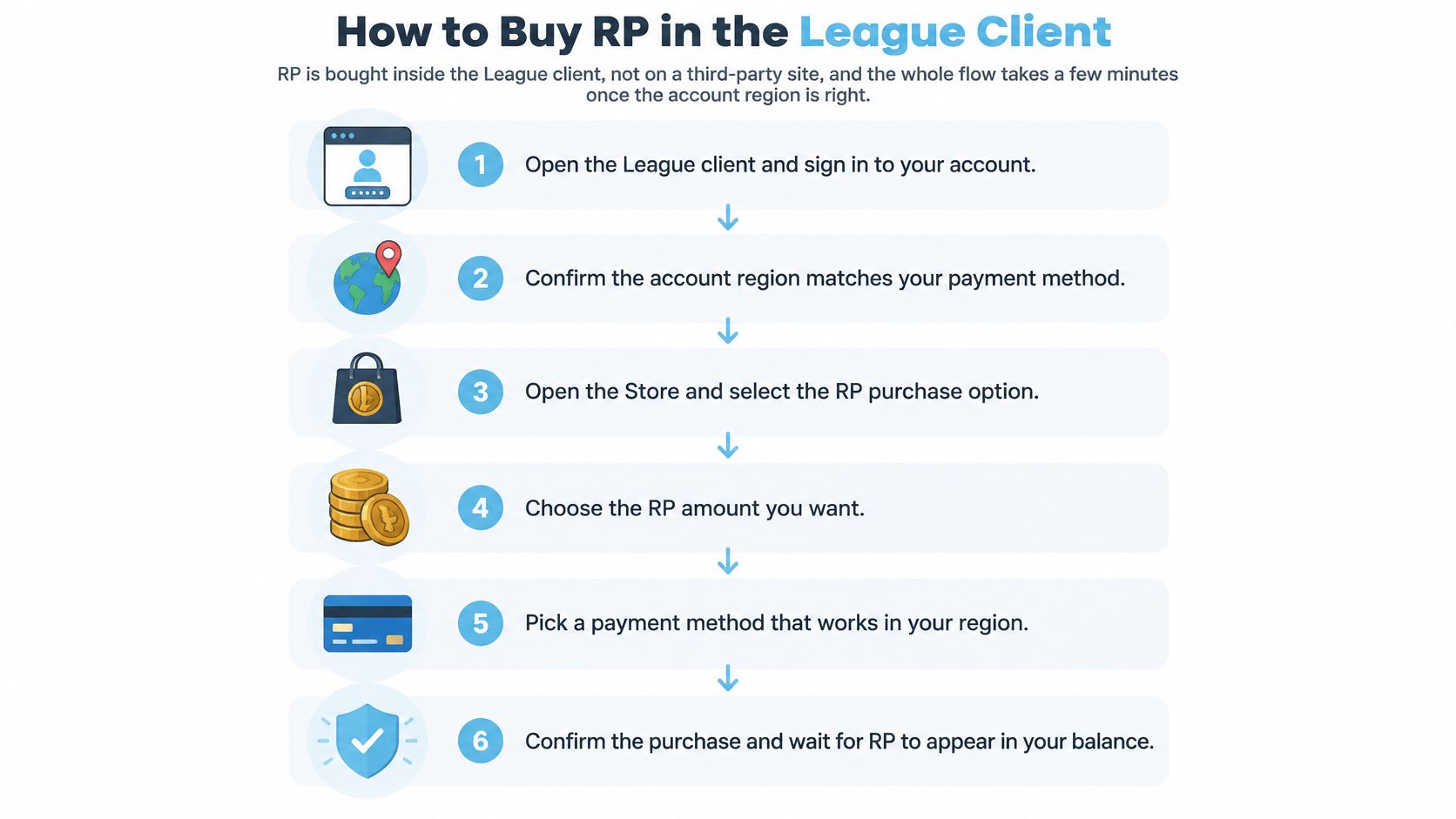
Treat the confirmation screen as your final check
The review before confirmation matters more than clicking through checkout quickly. An unexpected currency or denomination is a reason to stop and investigate, not something to accept because the bundle looks familiar.
For prepaid redemption, Riot's prepaid-card instructions require entering the PIN exactly as issued, without spaces, through the client's prepaid-card option. The same guidance lists the United States, Canada, Australia, and New Zealand for its LoL/TFT/LoR prepaid program, so don't assume a card bought elsewhere is eligible merely because its value looks right.
Match the account shard, code region, and game eligibility before redeeming. A voucher for another product or market doesn't become compatible because the seller describes it as gaming credit.
Practical rule: Once you've submitted payment, verify the result before creating another transaction.
Success means the RP appears on the intended account and you have a transaction confirmation to retain. Look for the receipt in your email as well, but don't use an email alone as proof that the balance has updated. If the receipt and client disagree, preserve both records rather than immediately buying again.
Matching Region, Shard and Payment Method
Which region should you select? The one matching the account that will receive the RP. Why can a working card fail? Your server's payment options may not support it, even if another merchant does. Can you use a code bought abroad? Only when its stated redemption eligibility matches your account.
Physical location, account shard, and payment eligibility are separate checks. That distinction matters if you live abroad, play on an overseas server, or pay with a card issued in another country.
Pre-purchase compatibility checks
Check | Where to look | What goes wrong |
|---|---|---|
Account shard | Client login and account details | RP credits the wrong account or region |
Payment method | Store payment screen | Card networks differ by server, so a working card can be rejected |
Prepaid code region | Code seller listing or packaging | Code from an unsupported market fails |
Denomination and currency | Confirmation screen | Unexpected effective price |
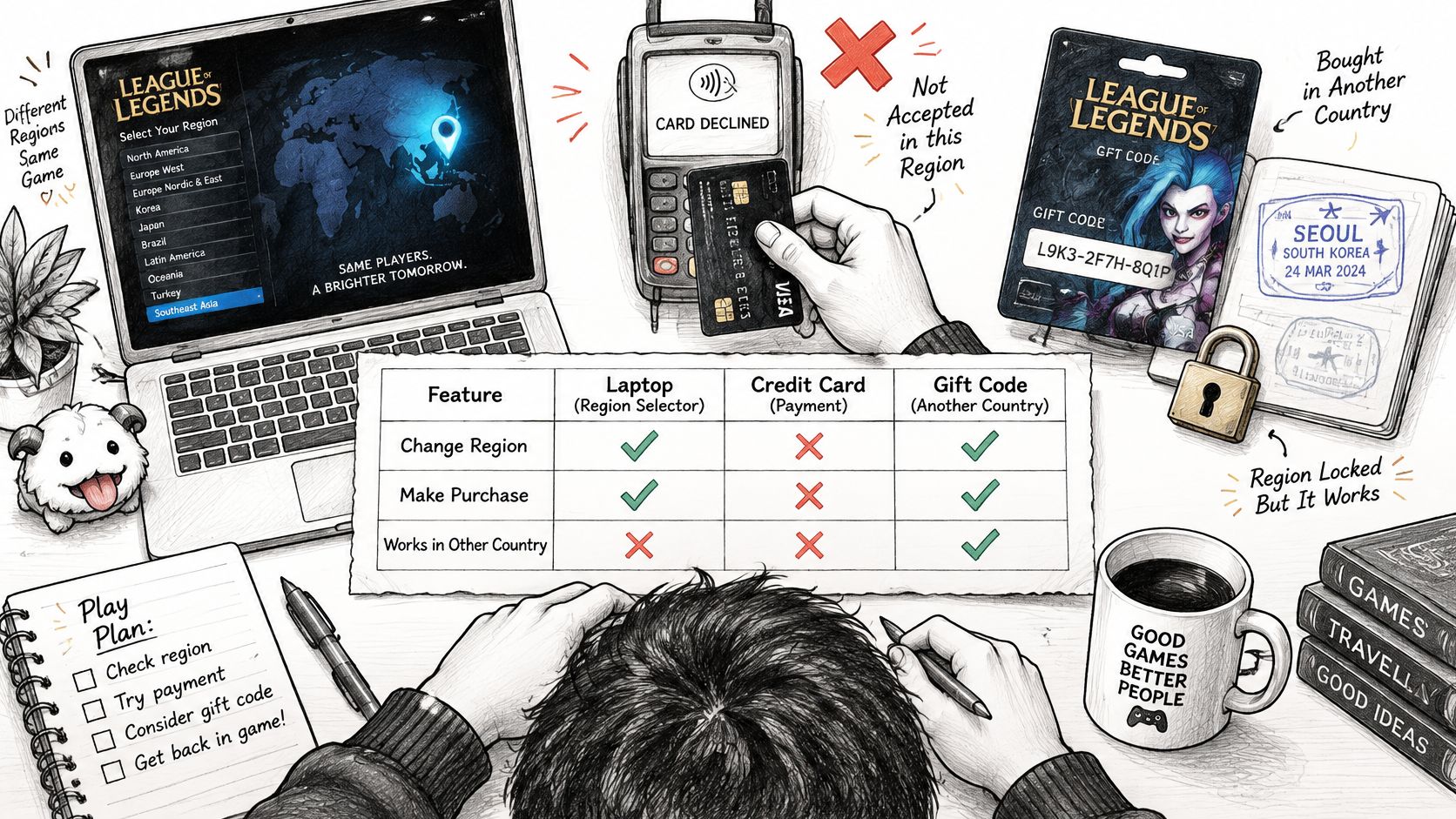
Use the payment options your client actually displays
Riot's payment-method guidance explains that availability changes by region, platform, and local provider, with examples including European bank transfers and digital wallets, plus carrier billing and local wallets across Asia-Pacific, India, and Vietnam. Its card guidance also distinguishes server support: Japan accepts Visa, Mastercard, and JCB, while Brazil supports additional networks.
A familiar payment logo on a seller's website doesn't establish that your League account can use the resulting product. Likewise, a friend's successful checkout on another server doesn't establish that your card will work on yours.
When regional card payments are disabled, Riot doesn't provide a restoration estimate. Choose another method already offered in the client rather than planning around an assumed recovery time.
For international buyers, including players paying from Nigeria, don't substitute your residence for your account shard when checking a voucher. If the listing doesn't clearly establish compatibility, leave it unpurchased.
The reliable order is account shard first, eligible payment method second. Don't choose a cheaper foreign-market product and then try to make your account fit it.
RP Bundles and What Each Actually Costs
Reference RP bundle prices and effective rates, North America, after the August 2022 change
Bundle | Reported US price | Effective price per RP |
|---|---|---|
1,380 RP | US$10.99 | About US$0.00796 |
13,500 RP | US$99.99 | About US$0.00741 |
These historical prices reflect the August 19, 2022 adjustment documented in LoLTheory's RP pricing guide. The larger bundle gives more RP per dollar, but these figures are reference values, not a current global price list. Check the offer displayed in your client before paying.
Use final payment cost ÷ RP received to compare offers. Include applicable tax, currency conversion, and payment costs. A cheaper advertised bundle can lose its advantage once those costs reach checkout.
Better unit value can still mean unnecessary spending
Start with what you intend to buy. A larger bundle lowers the unit cost only by committing more cash, and unused RP cannot fund purchases outside your account.
For a hypothetical champion purchase at the 975 RP price listed in Riot's March 2025 champion-pricing overview, the smaller reference bundle would leave 405 RP. That balance helps if another planned purchase uses it. Otherwise, it is money committed to League rather than a saving you can spend elsewhere.
The best bundle funds your planned purchases without turning a modest checkout into a larger commitment.
If you're considering a cryptocurrency-funded voucher, our guide to buying League of Legends skins with crypto explains that route. Compare the full checkout cost and redemption conditions against the client's offer. A nominal discount does not compensate for an unusable code or a purchase that puts your account at risk.
I'd buy for purchases planned within the next few weeks. Better value per RP matters only when you want the additional balance.
Scam Checks Before You Pay
Irreversible fraud is a bigger danger than a slow checkout. A seller can advertise an attractive price while asking you to surrender the very thing that lets someone else redeem the purchase: the code.
Stop when you encounter these warning signs:
Unsolicited code requests: Someone asks you to send an RP PIN, even if they claim they need it to verify or activate your purchase.
Restricted payment demands: A stranger insists on cryptocurrency or gift cards and refuses an ordinary, documented checkout.
Manufactured urgency: The seller pressures you to pay before you can inspect the product's region or terms.
Login harvesting: A free or heavily discounted RP offer asks you to enter your Riot credentials on an outside website.
A cryptocurrency checkout isn't automatically fraudulent. The distinction is between choosing a documented payment option yourself and following an unexpected demand from someone who wants payment beyond recovery. The Coin Course's crypto safety basics for newcomers is a useful companion when evaluating unfamiliar payment requests.
Check the seller before releasing payment
Before checkout, establish that the storefront is official or the seller is clearly authorized. Then verify the destination account, supported market, denomination, final amount, and redemption instructions. Don't accept a seller's promise to resolve incompatible regions after payment.
Treat PINs and redemption screenshots as private assets. You can provide an order identifier when seeking help without posting an exposed code in a public comment, chat room, or social-media reply.
Payment legitimacy matters beyond the initial redemption. Riot's chargeback guidance documents account consequences when payments are reversed, so an RP balance appearing successfully doesn't make the underlying transaction harmless.
For broader checkout habits, our online-payment safety guide covers checks worth making before sending funds.
If you've already shared a code
Contact the seller or card issuer immediately and ask whether they can protect any remaining value. Preserve the conversation and payment records, report the suspected scam, and contact Riot support if your League account is involved.
If you also entered your credentials, change your password through the official account service. Don't pay a supposed recovery agent who promises to retrieve the code or repair the account.
For an ordinary purchase, finish through the official client, retain the receipt, and verify the credited balance privately.
Fixing Declined, Stuck or Prepaid Code Errors
Symptom, likely cause and fix
Symptom | Likely cause | First action |
|---|---|---|
Card declined at checkout | Network not accepted on your server or issuer blocks the charge | Check accepted methods, then contact your bank |
Prepaid code rejected | Code issued outside supported markets or wrong shard | Verify code origin before buying another |
Payment stuck or timed out | Authorization still pending | Wait, check balance, don't retry |
Balance not updated | Wrong account or shard, or delayed credit | Confirm account, then contact support with receipt |
PIN not accepted | Spaces or characters typed wrongly | Re-enter the PIN exactly as issued |
An error message identifies a symptom, not necessarily its cause. Don't change payment methods repeatedly while an earlier attempt remains unresolved, because that makes it harder to tell which transaction needs attention.
For a declined card, inspect the payment options currently shown for your account. If the method is supported, ask your bank whether it declined that specific merchant transaction rather than asking whether the card works.
Separate pending payments from invalid codes
A timed-out checkout needs verification before another attempt. Check your transaction history and RP balance, then retain any pending authorization or receipt information for support.
A rejected prepaid code needs a different response: inspect its issuing market, eligible game, and redemption terms. Buying another code from the same listing won't resolve a compatibility problem.
Troubleshoot the purchase you already made before spending money to replace it.
If the PIN itself is rejected, carefully compare the entered characters with the original delivery message or packaging. Copy only the code, without surrounding spaces or explanatory text, and don't share the full PIN in a public troubleshooting post.
Be especially cautious when someone responds to your failed purchase with a supposedly free replacement. AccountShare's free RP code scam warnings provide context for evaluating those offers, but account-specific payment problems belong with the seller or Riot support.
Send support a usable record
Provide the account shard, error wording, purchase method, transaction identifier, and approximate time of the attempt. Keep screenshots focused on the problem and redact unrelated payment information.
Pending authorization calls for patience and status checks. An incompatible code calls for seller clarification, while a paid transaction that remains uncredited needs a support request with the receipt. None of those problems is solved safely by handing a stranger your login.
Refunds and Chargebacks Explained
A refund and a chargeback solve different problems. A refund asks the merchant to return an eligible purchase. A chargeback challenges the payment through the bank or payment provider, and it can affect the League account tied to that payment.
Under Riot's refund policy, an RP purchase generally must be unused and requested within 14 days, with money returned to the original payment method. Prepaid-card purchases aren't refundable through that process. That distinction matters because a cheap-looking route can become expensive if the payment route cannot be reversed cleanly.
Refund and dispute routes by situation
Situation | Correct route | Window or limit |
|---|---|---|
Unused RP purchase | Refund request to Riot, returned to original payment | Within the policy window stated above |
Prepaid card purchase | Standard refund process does not apply | Not refundable this way |
Used RP | Refund generally not available | Not covered by the unused-purchase rule |
Unauthorized charge | Bank dispute, with possible account suspension | Per bank rules |
Chargeback repayment | Repayment route to restore balance | Repayment routes vary by region |
Choose the route that matches the problem
If you bought the RP yourself and haven't spent it, request an eligible refund from Riot first. Don't spend the balance while asking to reverse its purchase. Keep the RP balance stable during the request, since spending can weaken the case for an unused-purchase refund.
A prepaid purchase needs a check of the seller's terms before you assume Riot can return the original payment. If you purchased through our store, review our refund policy before requesting a resolution. Digital vouchers can have conditions tied to delivery, redemption, and the payment method used, so the route depends on the product you bought.
For an unauthorized charge, contact your bank promptly and notify Riot while securing the affected account. A payment dispute can trigger account suspension, and restoration may require repayment through an available regional route. Don't use a bank dispute as a shortcut for buyer's remorse or an unresolved display delay. That choice can cost more than the RP itself if the account is suspended while the payment review continues.
Keep transaction records until the issue is closed. The cheapest safe purchase is one you can authorize, redeem, document, and resolve, not merely the listing with the lowest advertised amount.
We offer digital gift cards and prepaid products, with cryptocurrency purchasing options and voucher delivery by email. Browse the League of Legends RP gift cards at Jour Cards, then check the exact region, denomination, and redemption terms against your League account before paying. You can also visit Jour Cards to explore other gaming products.

I totally relate to the hassle of buying RP! The payment options you detailed are super helpful; I remember struggling to figure it all out. By the way, while playing League, I often unwind by jumping into Drift Boss for a quick break from the strategy—those drifting mechanics are so satisfying!